So…you just dropped a hefty chunk of change getting your photos done with a professional photographer…what now? Well, in this day and age, the most popular option would be to buy the digital package so you can print your photos yourself and share with friends and family online. Makes sense, right? You want to save money…and it’s easy as pie to go to a one hour studio and have the print to hang on your wall that night! We’ve all done it (myself included.)
Well, that way is not always the best choice. I have seen this “post” done by several photographers on their blogs… but I was always skeptical. I always thought “oh yeah, that’s edited.” Well… I decided to try it for myself…and let’s just say, I am REALLY shocked. I have heard how bad consumer labs can be…but now I have seen it for myself. I can promise you that these are the prints in their true form. I have not done ANY editing whatsoever, other than just scanning the photo onto my computer and adding the lab name.
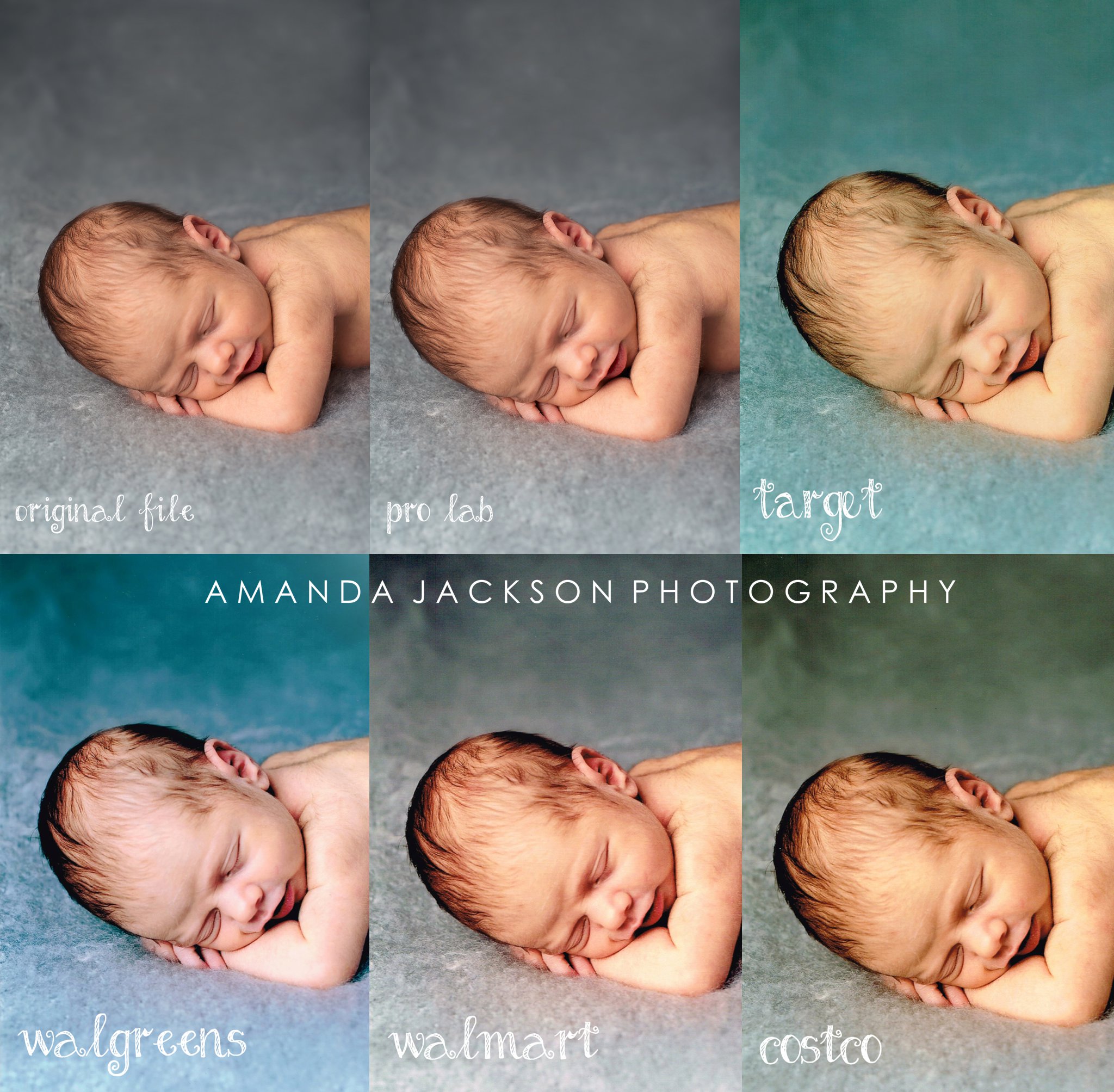
Each lab took their different spin on the photo…but ultimately, even the untrained eye can see what is wrong with each “version.”
Here’s another example. This time, I chose a photo with an “off white” background, just to see how the labs would work on that.
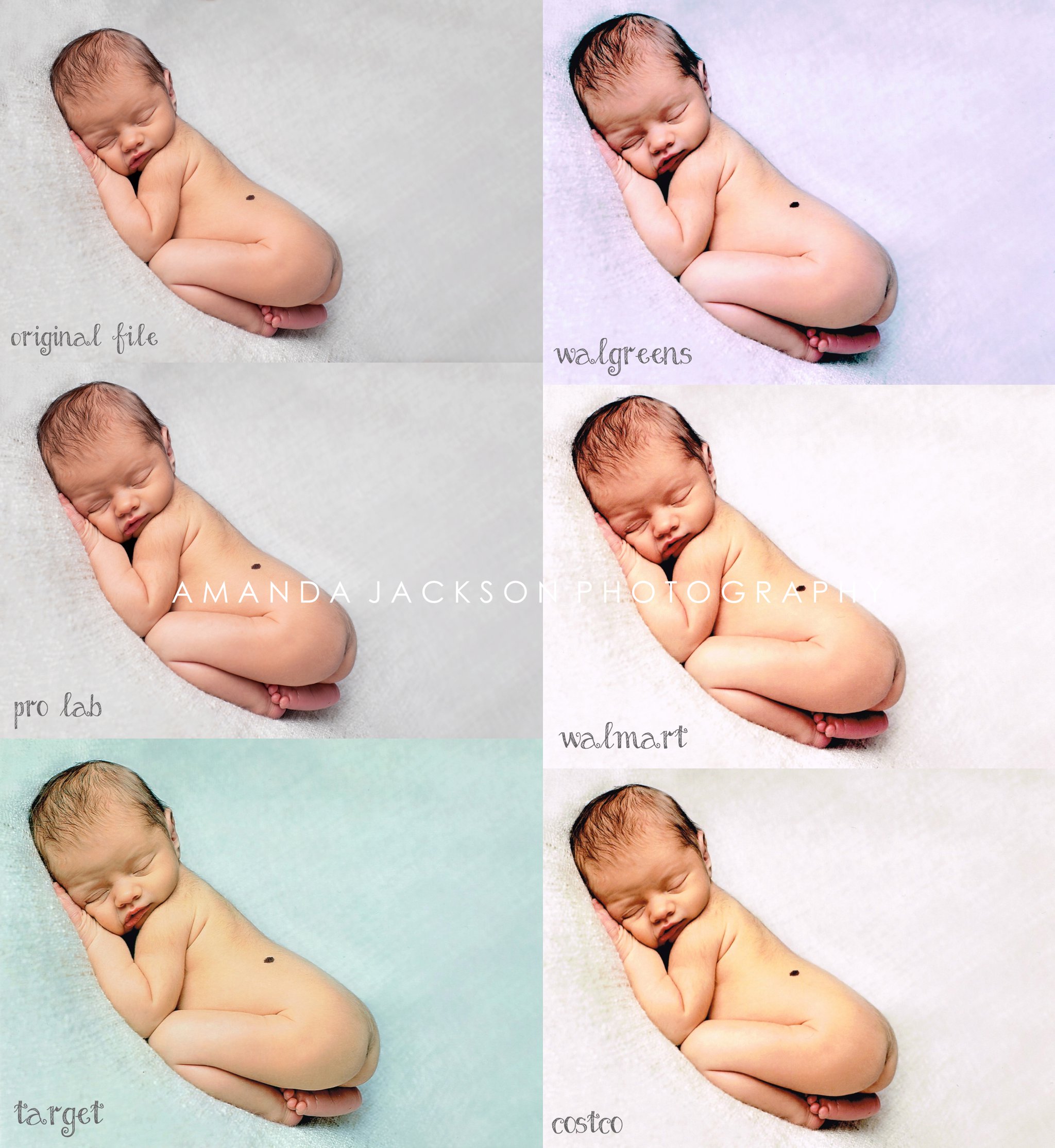
As one of my friends told me “It looks like a rainbow!” and it’s true! It personally makes me sad that THIS is how my work may possibly be displayed…especially since you (the client) spend hard earned cash on the experience of a professional photo session and are left with these as keepsakes (and the fact that they may be passed on to future generations!) and that I spend HOURS upon HOURS working on your session for it to turn out like this! yuck! It’s hard for me to swallow because as you can see…these examples are NOT what my work looks like…so if you order these prints, and you see how it comes out…it’s NOT ME! I promise!!!
Obviously these labs are great for printing snapshots where you don’t really care about quality…but if you are going to spend money on a great photo session that you can pass on to future generations, why waste it? Just some food for thought.
ADDED NOTE: Lab results will vary based on location. If you do decide to still print through these labs, be sure to click on “do not color correct” so your print gets as close to the photographer’s work as possible. Also…this post is not intended to “bash” these big box photo labs. It’s meant to educate…and show my clients the method to my madness! Also…if you do decide you do want to print the photos yourself, check out www.mpix.com. Although they aren’t going to get their colors EXACTLY with the photographer (it’s best if THEY do the ordering, that way they can take it up with the lab if the prints are off) they’ve been the best I have noticed from experience.
Edited to add (January 24, 2014)
This post was intended for my client’s eyes. If you are a photographer wanting to learn more, please feel free to contact me 🙂
Want to see another example? Check out my friend Lindsey over at Feather Blue Photography’s post!
Great blog post! I have had a similar experience with one of the printers you have displayed. But as a photographer do you have a prefer vendor? Do you offer them packages or do you just give them a USB. – Amanda O – ARO Arizona Photography in Phx AZ.
Well I disagree with at least one of the places you mentioned. I’ve been a photographer for 15 years and Costco is the best place to get prints printed. You have to download a printer profile for your monitor, once that is done you place an order with “auto correct” off. My photographs have always turned out the way they are suppose to and the workers their are very helpful!
As you can see from my “Added Note”, labs vary from location to location. I also said to turn off the Auto Correct so it gets closest to the photographer’s work as possible. Lucky for you that you have a Costco lab that works for you 🙂 Unfortunately it’s not the case from me, as you can see. These are true to life scanned in prints.
Costco does not guarantee their color and it depends on the person in charge of the machine at each place. My two local Costcos told me pretty much point blank that they do not calibrate and consistency is not important to them. I had two prints on the very same order. One a 5×7 and the other an 11×14 – the color was EXTREMELY off. I brought it to the attention of the tech and he said that it’s simply not going to match because they don’t calibrate their machines. He said that the only thing they do to “fix” the printer is change out the cartridge.
This is in reply to Lorrie’s post regarding her local Costco tech’s comments, which fortunately do not apply to all Costco labs. As Amanda had said, results do vary from one location to another. I work at the photo lab at Costco in Strongsville, Ohio, and we calibrate our Frontier lab EVERY morning and EVERY time we put in a brand new roll of paper. We have three lab operators, and we all care a great deal about consistency, and are capable and willing to get a very close color match to an existing print when requested. Yes, turning off auto correct is a very important first step. We have a large number of pro photographers who have downloaded the lab’s profile into their software, and are exceedingly happy with the consistent quality of the results. It saddens me, Lorrie, that your local Costco’s lab techs have lost sight of the whole point of Costco, which is going the extra mile to provide consistent QUALITY and please the customer.
As a wedding and portrait photographer myself (for more than 35 years) I became aware of Costco through a colleague, and started using them for my printing needs. I had also worked in camera stores and photo labs over the years as my ‘through the week’ job, both for steady income and health insurance. I decided I wanted to work for Costco, and have been able to continue my photography business along with my lab position. In both endeavors, I strive for doing my best each and every day. I’m truly sorry that you’ve had a bad experience at Costco.
I have seen a few of these posts around at the moment and it truly is shocking. If only clients realised what they are going to get from the cheaper places. Thank you
Yes. I want to see the same thing with a b/w photo. I know Walgreens sends them back green, would be interesting to see the “rainbow” of b/w’s from all the different labs. Maybe I’ll do that myself…
ooh good idea! You should try it!
I have to add that, like Cam, I have used Costco on occasion with good results because you can download their printer profile from drycreekphoto.com & edit the image beforehand so it will print correctly.